TLDR: I moved from a local OpenClaw setup in a tiny local macOS VM to a self-hosted Hermes Agent setup on a Hetzner VPS. I still talk to it through Telegram, but it now keeps running when my laptop is closed, has a safer file bridge to my Mac, can use Claude Code both inside and outside the Daocker container, and browses using a residential IP. This is written from my current setup: ‘local machine’ means my MacBook, and Anthropic and OpenAI Pro accounts are both used. The VPS runs on Ubuntu 24.04 LTS.
Why move away from the local VM setup?
With agent harnesses, many of us are trying the same thing: a personal assistant that knows how you work, your preferences & goals, etc. Not a chatbot that forgets everything each session. My first setup used OpenClaw in a tiny dedicated macOS VM via Lume. It was isolated from my host system, talked to me through Telegram, had its own Google Workspace account, and was version-controlled via GitHub & VM snapshots.
I’ve been very happy with my previous OpenClaw setup and had managed to get consistent performance out of it - given I wouldn’t update too often. Though I heard that part has got a lot better already. One Claude Max subscription gave me access to the best agent-capable model available at the time (in my opinion), and the whole thing felt surprisingly assistant-like. Then Anthropic tightened the boundary around Claude subscriptions and third-party harnesses. OAuth authentication for Claude subscriptions is now intended for Claude Code / Claude.ai and native Anthropic applications, not arbitrary third-party agent harnesses anymore.
So the next setup had two goals:
- Move the agent to something always-on, so it does not die when I close the laptop.
- Keep the “Opus feel” as much as possible while moving to Hermes and GPT-5.5 (since subscription use is allowed at the moment).
The setup that works for me
The new setup runs on a VPS with Ubuntu 24.04 LTS, setting me back ~15$ each month. Hermes and its monitoring dashboard run in Docker. I like the clear divide between any secrets, my customizations and the easy-to-update Hermes container. In general, updates don’t break things anymore so far. The costs are keeping oversight of (and occasionally resetting) users & permissions on the VPS, to keep infra security according to the plan. A Claude Code instance outside the Hermes docker helps with installs & maintenance. The full deployment plan also sits there to prevent drift from the planned security architecture, next to an actively maintained live progress doc. Components:
- outer VPS layer with SSH hardening, firewall, fail2ban, Docker (SSH-only)
- Docker containers for Hermes image, dashboard, Camofox browser
- Claude Code outside containers (‘Host Claude’) for maintenance & setup (SSH-only via VPS)
- Another Claude Code inside the container that Hermes can delegate to
- Syncthing acting like a private Dropbox creating a shared folder with my MacBook
- An ever-growing LLM Wiki & GitHub repos in the shared folder
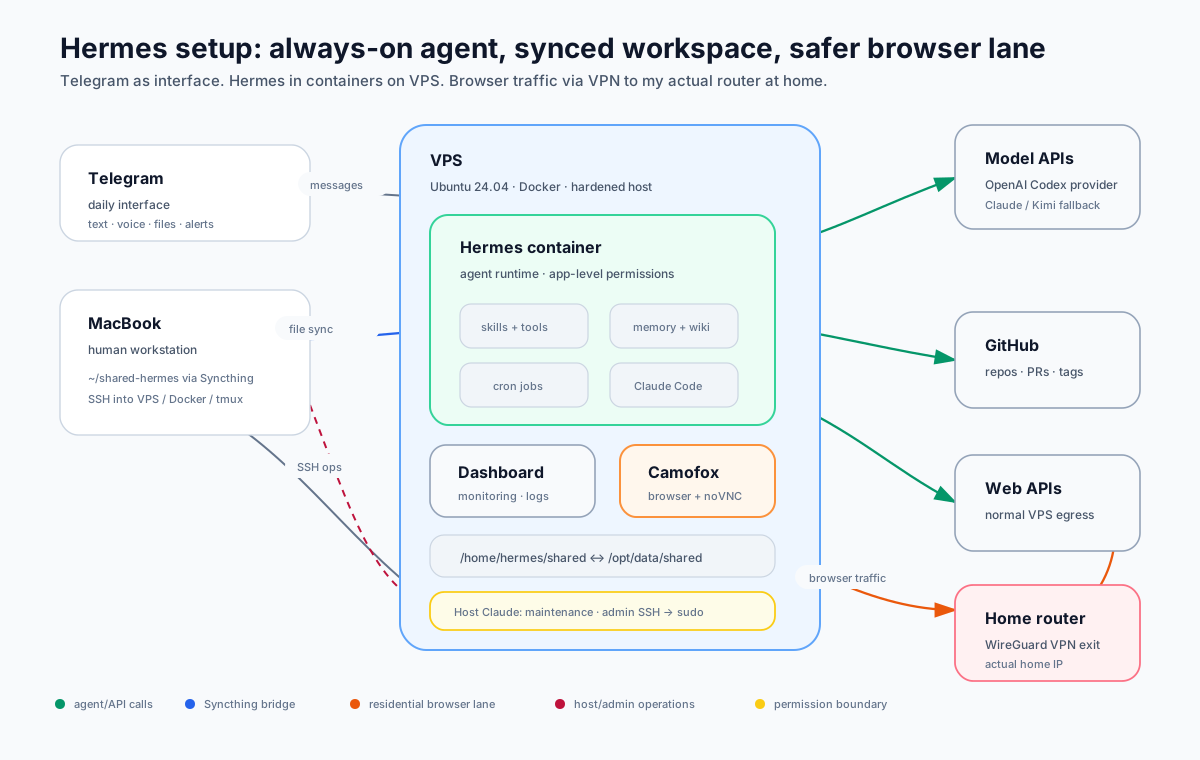
The VPS can only be reached with my SSH key, root user is deactivated. Agent traffic from inside the container reaches the internet directly (APIs etc.). For browser-based or ‘human-like’ tasks, Hermes’ Camofox browser plugin is set up to look inconspicuous and can only access the web via my actual home router (WireGuard tunnel + microsocks), keeping a low profile. File I/O works for me by dumping into or reading from the ‘shared folder’, and Hermes knows what I mean when referencing it. Normal interaction with Hermes via Telegram, maintenance via SSH.
Updating the Hermes container is trivial with docker compose build --pull && docker compose up -d and doesn’t touch any secrets or config outside the container.
Getting back the Opus feel with GPT-5.5
I was and still am shocked of GPT5.5’s default verbosity. Who wants to read all of that filler? What a waste of time. And the sycophancy, terrible. I found myself scrolling endlessly through single messages on Telegram. Things needed to change, drastically. I had host Claude look at the current config & recent messages, do research and described in detail how I’d like the agent’s behavior to change. Some examples:
| Lever | What changed |
|---|---|
SOUL.md | Added a short “pragmatic senior engineer” baseline plus explicit style, disagreement, and anti-sycophancy rules. |
USER.md | Added stable preferences: concise Telegram output, debug-first work, account-safe automation, repo conventions. |
agent.personalities | Added overlays like concise, brainstorm, review, and research (I keep concise active 99% of the time). |
agent.reasoning_effort | Set a reasoning mode for the main agent instead of letting the model decide. |
agent.tool_use_enforcement | Set to/kept on auto. Apparently the setting nudges to actually use tools. |
config.yaml snippet:
agent:
  service_tier: priority
  reasoning_effort: medium
  tool_use_enforcement: auto
  personalities:
    concise: >
      Single-paragraph or single-table when possible. No preamble, no summary.
      If a one-line answer fits, give one line. Skip tool preambles for tasks
      under 3 tool calls.
    review: >
      Rigorous reviewer. For each block sent: (1) what's correct, (2) what's
      wrong with a concrete reason, (3) minimal fix. No praise, no restatement.
      Disagree when there's evidence.
SOUL.md snippet:
# Avoid
- Sycophancy: "Great question", "Happy to help", "Got it", "Sure",
  "Of course", "Certainly".
- Preambles. Don't rephrase the request before answering.
- Tool preambles for tasks under 3 tool calls ("I'll start by reading...",
  "Let me first check...").
- Trailing summaries when the answer is already short. No recap of what
  the user can already read.
- Hype language: "incredible", "powerful", "seamlessly".
The final voice is much closer to what I want. Short by default, willing to push back, no fake enthusiasm, fewer disclaimers around tool use.
Clean, easy file exchange with the local Mac
I wanted file I/O between my laptop and the VPS to feel easy without giving the agent broad access to my local machine.
The tiny tool Syncthing is doing that really well, creating a Dropbox-like folder syncing instantly both ways: If I place a file into the shared folder on the Mac, it appears on the VPS. If the Hermes agent creates anything and dumps it in there, it appears on the Mac. Works flawlessly now, after some initial permission headache (Syncthing needs to ignore incoming permission bits for this folder from the Mac + I added ACL permission defaults & tiny watcher service on the VPS side).
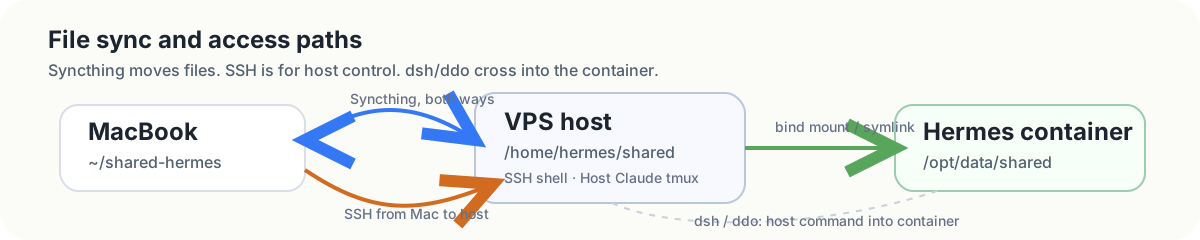
- Local Mac <-> VPS connection:
~/shared-hermes/syncs two-ways to/home/hermes/shared/ - in-container visibility on VPS:
/opt/data/shared/symlinked to/home/hermes/shared/
There are also three SSH entry points I use from the Mac:
| Profile | Lands where | Use |
|---|---|---|
| VPS shell | host shell | system checks, Docker, logs |
| Docker shell | Hermes container via dsh | inspect /opt/data, config, shared folder |
| Host Claude tmux | persistent tmux with host Claude Code | longer infra/debugging work that should survive laptop sleep |
Browsing like a human (or at least failing visibly)
Those who tried to have an agent do things on their behalf know that sometimes they need to click buttons in a logged-in session and behave like a human. And this browser ability was the thing I was most worried about losing when moving from a macOS VM to a Linux VPS. In the old setup, I could literally watch the browser. If the agent failed, I could see whether it clicked the wrong button, got blocked by Cloudflare, lost a login session, and so on.
I could recreate that visibility through the Hermes plugin Camofox and noVNC. To add stealth and avoid a data center IP, I repurposed a 2009 Mac Mini that I had lying around and turned it into a permanent WireGuard tunnel endpoint (flash-booted Ubuntu Server, a Pi would do the same job). So:
- Camofox runs an actual Firefox browser in another container.
- It uses a persistent browser identity (I can log in).
- Its locale/language/time zone details all match the IP.
- Browser traffic exits through a WireGuard tunnel to my home ISP connection (Wireguard + microsocks).
- noVNC lets me open the browser view manually when needed.
Browser fingerprint: Firefox on Linux, language & timezone configurable, residential IP. For it to beat the Cloudflare turnstile, it took some training using its browser tools (and preventing quicker shortcuts it really liked). Some lessons the agent updated its skill with:
- Use `browser_type`, `browser_click`, and `browser_press` for interaction. Don't write form values through JS.
- Resnapshot after any meaningful page change. Don't reuse old ref IDs.
- React typeaheads need real input events and sometimes ArrowDown / Enter.
- Cross-origin cookie banners are a real limit: if the iframe is not in the accessibility tree, there is nothing to click.
- Cloudflare Turnstile checkboxes are sometimes solvable with Tab + Space, especially when verifying focus visually first.
I can now see what the agent does in a browser again. When the browser is used, I can open a browser tab to https://<vps-ip>:<port>/vnc.html, enter a simple token and watch the browser in real time, as stream running over WebSocket inside the VPS. Browser traffic is strictly routed through the WireGuard tunnel to the Mac Mini’s home ISP connection before it reaches the web. The outside world sees my home router’s residential IP and a (hopefully) perfectly ordinary Firefox-on-Linux browser fingerprint.
Maintenance & Docker path pain
With this setup I have
- a Claude Code instance inside the Hermes container, for coding tasks and normal repo work (Hermes can delegate via wrapper at
/opt/data/bin/claude, scripts run inside container - another Claude Code instance on the host outside the container for infra tasks (reachable via SSH for me with admin rights or through
/opt/data/bin/claude-hostwith restricted permissions for Hermes over SSH.
But for me, one big downside of having Hermes run in a container has been the constant docker compose -f <path> exec ... prefix pain for half the cmds you use (the hermes CLI lives inside the container). So over time, I added more and more wrapper aliases that I use & have encouraged Claude Code to use, making his actions more readable & easier to approve/whitelist:
| Alias | Use | Replaces |
|---|---|---|
hermes <args> | Run the Hermes CLI inside the container | docker compose -f /home/hermes/hermes-stack/docker-compose.yaml exec hermes /opt/hermes/.venv/bin/hermes |
dsh | Interactive shell in the Hermes container | docker compose -f /home/hermes/hermes-stack/docker-compose.yaml exec --workdir /opt/data hermes bash |
ddo <args> | Run one command in the Hermes container | docker compose -f /home/hermes/hermes-stack/docker-compose.yaml exec --workdir /opt/data hermes |
hchat -q "ping" | Manually trigger Hermes agent (so Claude can test Hermes) | docker compose -f /home/hermes/hermes-stack/docker-compose.yaml exec hermes /opt/hermes/.venv/bin/hermes chat -q "ping" |
dlog | Follow Docker compose logs with readable timestamps | docker compose -f /home/hermes/hermes-stack/docker-compose.yaml logs -f -t plus timestamp cleanup with sed |
alog | Follow the Hermes agent log | sudo tail -f /home/hermes/.hermes/logs/agent.log plus timestamp cleanup with sed |
cronlog | Show the latest cron output | ddo bash -c 'find /opt/data/cron/output -name "*.md"; sort newest; head -1; cat file' |
hermerr | Show recent warnings/errors | sudo tail -80 /home/hermes/.hermes/logs/errors.log |
hermgw | Show recent gateway/platform events | sudo tail -80 /home/hermes/.hermes/logs/gateway.log |
These commands/definitions now live in a canonical /usr/local/lib/hermes-cmds.sh, with thin wrappers only in /usr/local/bin. That change made them work from a normal shell, from cron, and over non-interactive SSH. Old-school shell aliases would not. The agent and I can both refer to the same paths, aliases, logs, and state files.
AND - they now work when my local laptop’s Claude Code SSH’es into the VPS too, making command approvals more readable & easier to whitelist.
Some recommendations to prevent frustration
It feels good. Finally my agent
- keeps running when the laptop sleeps.
- has a shared folder with my Mac.
- has a persistent browser I can watch (fun but slow movements still).
- beats the Cloudflare turnstile
- can read, advise on & pull from my GitHub projects & do work locally (no commits or pushes yet)
- keeps a shared taskboard with my with its own Google Workspace account
- grows a local Wiki in the shared folder ( =Obsidian Vault on my Mac)
And on top of that, I can now hand off tasks from my local Claude Code to the VPS (e.g. when I have a bad connection - tmux is a real life saver here), or even use Termius and log into VPS Claude Code staight from the phone. So yeah, my Claudes can talk to each other - kind of. :)
Things that help me not get lost:
- Keep canonical paths documented There should be no ambiguity about what “the shared folder”, “the git repo”, “the wiki”, or “host Claude’s working dir” means. Else things might get messy.
- I still have the initial deployment plan. The agent knows where to find it, and we both try to keep it as alive as possible. This helps keep future sessions from getting confused by stale info & is a nice source to ingest so the agent is aware of its own deployment details & state.
- Cron governance. Once you have more than a handful of scheduled tasks (morning briefing, infra health checks, used-shopping scans, taskboard monitors, heartbeat nudges, etc.), a system for them might be needed. Many things might work. I maintain a cron registry (
cron-registry.json) that catalogues every job with model, scope, state files. A human-readablecron-landscape.mdlives in the wiki. The agent checks both before creating new jobs. 2 more things to keep updated of course though.