TLDR: Workspace files (AGENTS.md, CLAUDE.md, etc.) have a size sweet spot: You want to keep them within bounds. You can auto-compact them regularly, then use git to keep track of any unintended purges, and add back lost bits easily.
What are workspace files?
In agent frameworks (Claude Code, Codex, OpenClaw, etc.), files like AGENTS.md, CLAUDE.md, USER.md, TOOLS.md etc. are very effectively improving your agent’s answers by giving the model context about who it’s working with, how to behave, which tools to use and how to use them and what rules to follow, without the user having to explain every session. They create statefulness.
The downside is that those that are auto-injected to every session make every single prompt more expensive & cause the context ceiling / session limit to be reached earlier. This is because every time you send a message to the API, it includes the full system prompt (with all workspace files), the entire conversation history, and your new message.
So there’s a need to weigh workspace file sizes against the system prompt bloat they come with. There might also be a sweet spot regarding workspace file sizes. At this moment and with current context window sizes, this has worked for me, for the OpenClaw framework:
| File | Target | Hard Max |
|---|---|---|
| AGENTS.md | ~700 tok | 1,000 tok |
| SOUL.md | ~450 tok | 600 tok |
| USER.md | ~220 tok | 400 tok |
| TOOLS.md | ~670 tok | 1,000 tok |
| IDENTITY.md | ~80 tok | 150 tok |
| HEARTBEAT.md | ~260 tok | 400 tok |
| MEMORY.md | ~600 tok | 1,500 tok |
| Total | ~3,000 tok | 5,000 tok |
In general, recommendations exist in the community to keep files under 3,000-5,000 tokens in total.
Compact them with a skill + schedule it!
As with a Windows installation, workspace files tend to grow over time, and become less efficient. Mine had ballooned to 12k tokens. I noticed the agent stopped following instructions as reliably, things belonging together logically were scattered across multiple files, and keeping them free of contradictions manually became an impossible task.
So I created the spring-clean skill (specific to OpenClaw at this point), based on what I could find that worked for others. It audits all workspace files against the recommended file/token sizes, flags cross-file conflicts and redundancies, catches stale content, and proposes changes for my approval, before actually touching anything. I’m now running this automatically once a week, and the impact was instant:
- workspace file size compacted 80%
- less agent confusion around tool use and supposed “clear” standing instructions
- increased session lifespan (due to a smaller system prompt)
Version-control & monitor them!
I’ve written about using git tags in unorthodox ways before, and how you can utilize git log —oneline to surface them in a handy and compact way. I find tags helpful to clearly mark important past states that I’m likely to need snippets from again. So they can function as your layer of meaningful changes, abstracting away the single-commit layer, especially if you move to automate the snapshots/commits at some point.

So I would suggest to version-control your workspace files at least locally, and commit every once in a while, so your changes turn into a clean sequence of discrete incremental changes. This might be the most straightforward way to check on the actual changes your agent makes to the workspace files in the background, and lets you prevent workspace file bloat proactively.
The workflow: every other day you run git status to show which files have changed at all:

Any surprises? If so, just diff the file (git diff TOOLS.md):
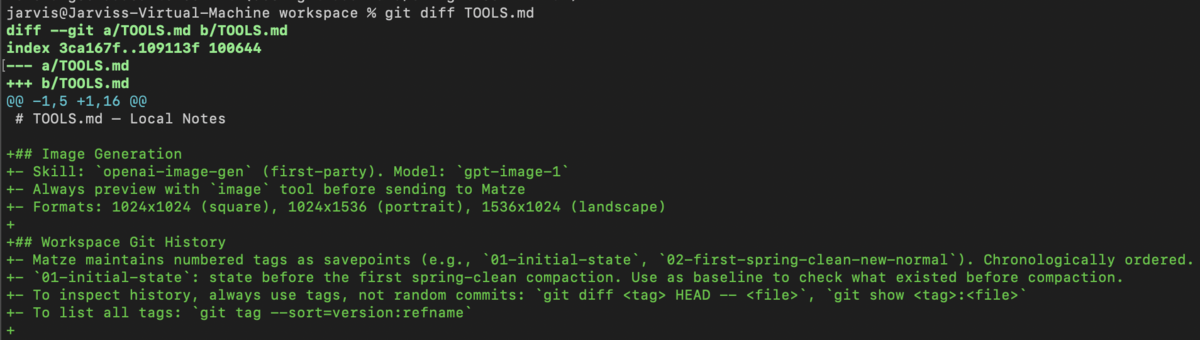
git as shared interface both you and the agent can query
While very effective, the first “big purge” had also taken out a little too much in my case. Instructions that proved to be essential, and that I needed to add back now. This was a matter of minutes though, because I had the files version-controlled. So I could just ask my agent:
“How come you didn’t know how to use tool x right away? I suspect some instructions got purged from the workspace files in the last compaction. Check the git history and suggest what to add back.”
This instantly fixed it. The agent now knows what you mean by “the last compaction” and which state to compare the current files to. So overall, if you’re like me and constantly add instructions in an effort to have the agent casually translate your underspecified speech to the proper use of specific tools under the hood, you might want to:
- keep the size of your workspace files in check somehow
- version-control them in a way that feels natural to you, and is accessible to your agent without too much friction.